
In short
- Record the visit on your iPhone: talk, take photos, say the room, mark what matters.
- Quote Metric types it up and finds the scope, with the words or photo behind every item.
- You price it from your own rates and merchant quotes, answer the trade questions, and choose a Quote, Proposal or Budget estimate.
- You share it from your phone. The customer accepts on a link, and the agreement, variations and payments stay with the job.
1. Set up once
Add your firm's name, logo, contact details and whether you are VAT registered. Put your common materials and labour rates into Materials and rates, your price book. Save the sections and lines you use again and again as Quote templates, such as a standard combi swap or a basin replacement.
Your terms start as plain default wording, with a cancellation notice for customers at home. Both are marked as not yet checked. Nothing goes out until someone in your firm ticks that the wording is yours. Read the 14 day right to cancel if you are not sure why that matters.
2. Record the visit
Make the job the quick way: say it, paste the customer's message, use a screenshot of their text or email, or tap Here for the address you are standing at. Quote Metric fills in the customer, phone, email, address and the job, and never reads a price out of a message.
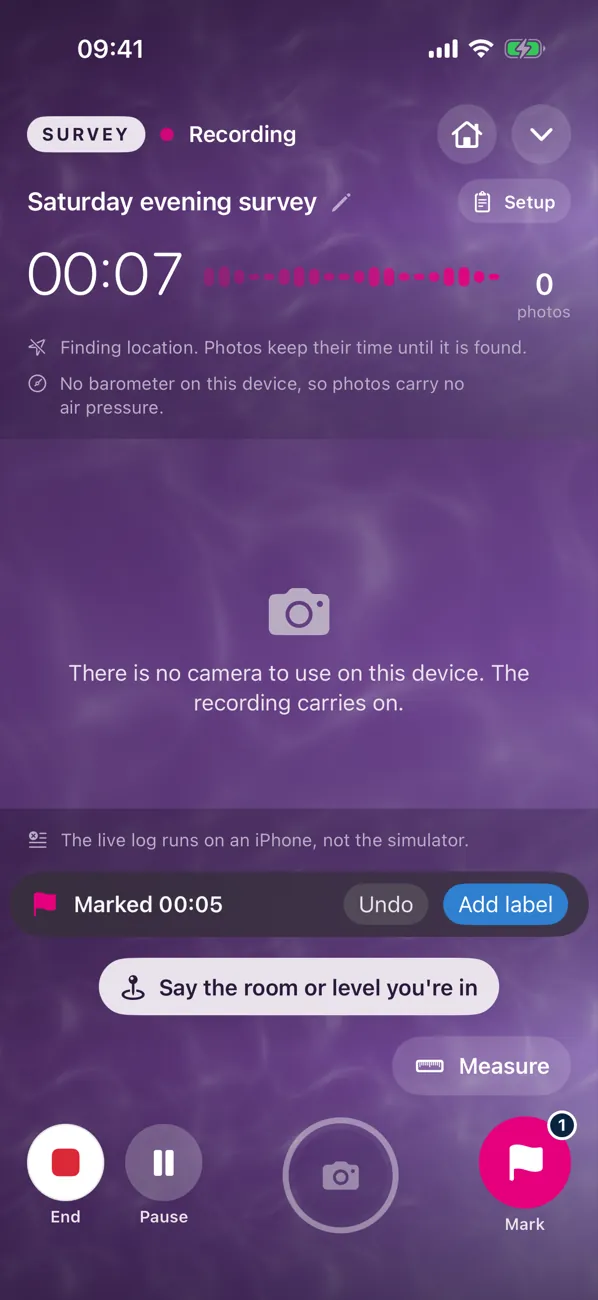
Then tap Start Site Visit and it opens straight into the camera. Do what you would do anyway: walk round, look, talk, take photos.
- Say the room. "Kitchen." "Upstairs bathroom." Photos and words are filed under it.
- Mark a moment. Tap Mark when the customer says something you must not lose, like "we want the tap moved to the window".
- Measure. Say the measurement out loud, or use Measure on the phone for a rough figure.
- Pause when you are talking about the football. Resume when you are back on the job.
3. Typed up, scope found
When the visit reaches the server, the recording is typed up and Quote Metric goes through it. It proposes each item of work with the room, the quantity and the words or photo it came from. Each item has no price.
You accept an item and it lands on the estimate, priced from your price book where an item matches. You can play back the exact moment behind any line, so "did she say two radiators or three?" takes one tap to settle.
4. Price it your way
Every rate on a Quote Metric estimate comes from one of three places:
- Your price book. Materials and labour you have set.
- A supplier quote. Upload the merchant's quote for the job. Quote Metric reads the lines and you choose which to use, with the document, line and date kept against the price.
- A manual rate. Typed in, with who set it and why.
Markup and margin show side by side in private, so you know whether 25 percent on cost really gives you the 20 percent margin you think it does. It does. See markup vs margin.
5. Before it can go
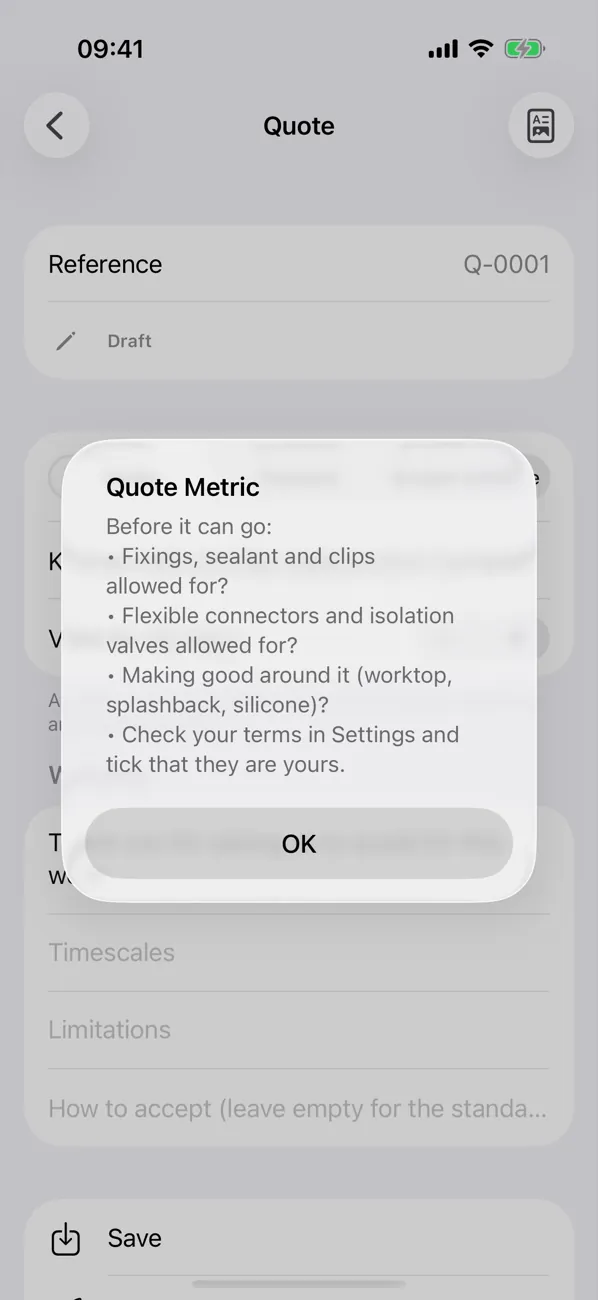
Quote Metric checks the estimate against the trade pack and its own rules. It holds the quote while there are:
- items the trade pack expects but cannot find, such as isolation valves on a sink swap or the condensate route on a boiler;
- lines without a confirmed quantity or rate;
- a rate the AI suggested that nobody has approved;
- terms nobody in the firm has ticked as theirs.
A budget estimate can go out with stated allowances. A quote cannot, because a quote is a fixed price your customer can hold you to.
6. Quote, Proposal or Budget estimate
Pick the document. All three come from the same priced scope, so they always agree.
- A Quote is the short offer: the work, the price, VAT, exclusions, validity and how to accept.
- A Proposal adds what you found, the photos you choose, how you will do it and the options side by side.
- A Budget estimate gives an honest early figure with allowances clearly labelled.
Set how long it is valid, choose the photos the customer sees, and preview the PDF. Then issue it. An issued revision is frozen: rates, quantities, VAT, terms, photos and PDF, exactly as sent. Read which one to send.
7. Share it, get the yes
Share from your own phone: WhatsApp, Messages, email, or copy the link. Quote Metric never sends anything to a customer by itself.
The customer opens the link on their phone, reads the scope and your terms, chooses any options and accepts with their name. Quote Metric works the total out again on the server from the issued version and records exactly what they accepted. Photos they see have had location and camera data removed.
8. After the yes
The job's status moves to won. From there:
- Agreement. Signed in person on your phone or by link, by the customer and by you.
- Variations. Extra work agreed in writing as it comes up.
- Payments. Ask for a deposit as a percentage in your terms, and it becomes the first payment stage when the customer accepts. They pay by bank transfer to your account or your own payment link (SumUp, Square, PayPal or a Stripe link), and on site they can scan a QR code on your phone. Received, due and overdue at a glance.
- Job log and calendar. What happened and when you are back.
On the computer too
The browser platform at app.quote-metric.com holds the same jobs and visits, laid out for a desk: the visit timeline with playback, the estimate, supplier quotes, templates, contracts, payments and the calendar. Home shows the pipeline by status, the next eight weeks of work, and an Ask and search bar that answers "who owes me money?" from your own records.
Common questions
How long does typing up take?
It starts as soon as the visit reaches the server, and a longer visit takes longer. You get on with the next job; the scope is usually waiting by the time you sit down to price.
Do I have to talk in a special way?
No. Talk as you would to a mate holding the tape. Saying the room and counting items with "next item" helps, but it is not required.
Can I start a quote without a recording?
Yes. Start from a blank estimate, a quote template or a copy of a previous job. The recording helps; it is not compulsory.
Can the office finish a quote started on site?
Yes. A visit recorded on the iPhone shows up in the browser with its timeline, photos and found scope, so someone in the office can price and check it.